CART
0
YOUR CART
A Toshiba Hard Disk Drive (HDD) is a storage solution designed for desktop computers, laptops, external storage, surveillance systems, NAS devices, and business environments. Toshiba offers different hard disk models to meet various storage requirements, whether you need additional space for personal files, office documents, multimedia content, gaming libraries, or important business data.
The Toshiba hard disk price in BD depends on factors such as storage capacity, model series, form factor, rotational speed (RPM), interface, cache memory, and intended application. Toshiba provides internal and external HDD options, with product series designed for everyday computing, performance-focused PCs, NAS storage, and surveillance systems.
Toshiba desktop hard disk drives are designed to provide additional storage for personal computers, office workstations, and gaming systems. Depending on the model, they can offer different storage capacities, performance levels, and features for everyday computing.
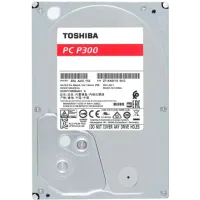
Toshiba P300 is a desktop HDD series designed for home and office computing, while the X300 series targets performance-focused desktops and gaming PCs.
Before purchasing a desktop HDD, check its storage capacity, 3.5-inch form factor, SATA interface, RPM, and compatibility with your motherboard and PC casing.
Toshiba laptop hard disk drives are designed for compatible notebook computers that require additional internal storage. The L200 series is a 2.5-inch laptop HDD option intended for everyday laptop users and gamers.
Before buying a Toshiba laptop HDD, check the physical dimensions, drive thickness, SATA interface, and compatibility with your laptop model. Some newer laptops support SSD storage only, so verify the manufacturer's specifications first.
An internal Toshiba HDD is installed inside a compatible desktop computer, laptop, NAS device, or other supported storage system. It provides space for operating systems, applications, documents, photos, videos, and other digital files.
Toshiba offers internal HDD series for different applications, including desktop computing, laptop storage, NAS systems, surveillance, and enterprise environments.
When choosing an internal hard disk, consider its capacity, form factor, interface, rotational speed, and intended workload.
A Toshiba external hard disk is a portable storage solution that connects to compatible devices through a supported USB interface. It is useful for transferring files, backing up important documents, storing photos and videos, and expanding available storage.
Toshiba's Canvio range includes portable external storage options for compatible computers and other supported devices. Depending on the model, connectivity and device compatibility may vary.
Before purchasing an external HDD, check its storage capacity, USB interface, compatibility, and included accessories.
The Toshiba hard disk price in BD varies depending on the model, storage capacity, form factor, performance specifications, and intended use. Different Toshiba HDD series are designed for different storage requirements, from everyday desktop computing to NAS and surveillance applications.
Before purchasing a Toshiba hard disk, consider:
Storage capacity (500GB, 1TB, 2TB, 4TB, and higher, depending on availability)
Form factor (2.5-inch or 3.5-inch)
Interface (SATA or supported USB connection)
Rotational speed (RPM)
Cache memory
Data transfer performance
Internal or external storage requirements
Compatibility with your computer or storage system
Intended workload
Warranty and after-sales support
Toshiba offers performance-focused HDD options for gaming desktops and content creation systems. The X300 series is designed for performance-oriented PCs and gaming applications, with model-dependent storage capacity and performance features.
A Toshiba HDD can provide additional space for game libraries, recordings, videos, and other large files. For faster boot times and game loading, you can pair an HDD with an SSD for your operating system and frequently used applications.
A Toshiba hard disk can be a practical storage option for compatible home and office computers. It provides additional space for documents, spreadsheets, presentations, photos, videos, applications, and other important files.
The P300 series is designed for everyday desktop computing, making it a suitable option to consider for compatible home and office PC builds.
Choose a storage capacity based on your current requirements and future file storage needs.
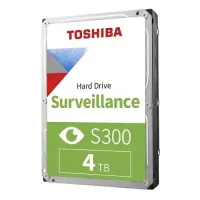
Toshiba surveillance HDDs are designed for compatible CCTV and video recording systems that require continuous operation. The S300 series is developed for surveillance applications, while other models are available for different recording and analytics requirements.
If you need a Toshiba HDD for a DVR or NVR system, check its compatibility with your recording device, supported camera configuration, storage capacity, and workload specifications before purchasing.
A Toshiba NAS hard disk is designed for compatible network-attached storage systems used in homes, offices, and business environments. NAS storage allows multiple authorized users and devices to access shared files through a network.
Toshiba's N300 series is designed for NAS applications, including home offices and small businesses that require storage for shared data and continuous operation.
Before choosing a NAS HDD, consider the number of drive bays, supported RAID configuration, storage capacity, workload requirements, and compatibility with your NAS device.
Toshiba offers different HDD series for specific storage applications.
Toshiba P300: Designed for everyday desktop PC and home or office computing.
Toshiba X300: A performance-focused internal HDD series for gaming PCs and professional desktop workloads.
Toshiba L200: A 2.5-inch laptop HDD series for compatible notebook computers.
Toshiba N300: Designed for NAS systems and shared storage environments.
Toshiba S300: Designed for compatible surveillance systems and continuous video recording.
Toshiba Canvio: A range of portable external hard drives for convenient file storage and transfer.
Both HDDs and SSDs are used for computer storage, but they offer different advantages.
HDD: Uses magnetic storage technology and is suitable for users who need additional storage capacity for documents, videos, games, backups, and large files.
SSD: Uses flash memory and generally provides faster boot times, application loading, and file access.
If you need both storage capacity and faster system performance, consider using an SSD for your operating system and essential applications alongside a Toshiba HDD for additional storage.
The best Toshiba HDD depends on your device, storage requirements, and budget.
For desktop PCs: Consider a compatible Toshiba P300 HDD for everyday home and office computing.
For gaming PCs: Explore the Toshiba X300 series for performance-focused desktop storage.
For laptops: Check the Toshiba L200 series if your laptop supports a compatible 2.5-inch SATA HDD.
For CCTV systems: Consider a Toshiba S300 surveillance HDD compatible with your DVR or NVR.
For NAS storage: Explore the Toshiba N300 series for supported network-attached storage systems.
For portable storage: Consider a Toshiba Canvio external HDD for convenient file storage and backup.
Always verify the exact model specifications and device compatibility before purchasing.
If you are looking to buy a Toshiba Hard Disk in Bangladesh, Computer Source offers computer storage solutions for desktop users, laptop owners, gamers, professionals, and businesses. Explore available Toshiba HDD models and compare them based on storage capacity, model series, form factor, interface, performance, and current price.
Whether you need an internal hard disk for your desktop PC, a compatible HDD for your laptop, a portable external drive for backups, or a surveillance hard disk for your CCTV system, choosing the right Toshiba storage solution can help meet your requirements.
Check the latest Toshiba Hard Disk price in BD at Computer Source and choose a suitable storage device for your computer or storage system. You can also explore SSD, RAM, motherboard, processor, and graphics card options to complete or upgrade your PC build.